
 Welcome bonusUp to 2 000 CAD + 100 FS
 Welcome bonusUp to 2 000 CAD + 100 FS


Instant
Quick & easy deposits

Up to 60 mins
Avg time for processing withdrawals

24/7
Customer Support

58,687 CAD
Customer Support
Casino



Live Casino


Promotions
Tournament
Golden Entry
Prize Pool
600 CAD real money + 60 FS
Promo
Install the App
What’s offered
20 no-deposit Free Spins


Level system
- Lvl.1/10Crystal0 - 30 CP
Your success starts here! Collect CP, unlock new levels, and get cool benefits for a bright game.
- Lvl.2/10Quartz30 - 110 CP
Just a little more and you can get:
- 5 FS
- 10 FS
- 15 FS
- 16 FS
- 17 FS
- 18 FS
- 19 FS
- Lvl.3/10Quartz30 - 110 CP
Your success starts here! Collect CP, unlock new levels, and get cool benefits for a bright game.Your success starts here! Collect CP, unlock new levels, and get cool benefits for a bright game.Your success starts here! Collect CP, unlock new levels, and get cool benefits for a bright game.Your success starts here! Collect CP,
- Lvl.4/10
Your success starts here! Collect CP, unlock new levels, and get cool benefits for a bright game.Your success starts here! Collect CP, unlock new levels, and get cool benefits for a bright game.Your success starts here! Collect CP, unlock new levels, and get cool benefits for a bright game.Your success starts here! Collect CP,


LuckyHills Mobile Casino — Play From Any Device, No Download Needed
The LuckyHills mobile casino runs entirely in your browser. No APK file, no App Store listing, no installation step that asks you to trust an unknown source. Open luckyhills.app in Safari or Chrome on your phone, log in, and you’re playing — the same account, the same balance, the same 7,000+ games you’d find on a desktop.

We use a Progressive Web App (PWA) format. That means the casino runs as a web application that behaves like a native app without occupying space in your app store. You get a shortcut on your home screen, push notifications if you choose to enable them, and games that load directly in the browser without extra software.
What Devices Work With Our Mobile Format
Our PWA runs on Android, iOS, Windows PC, and macOS. If your browser is up to date, the casino loads correctly — no exceptions tied to specific manufacturers or operating systems.
Here is a quick breakdown by platform:
- Android — use Chrome or any Chromium-based browser; add to home screen from the browser menu
- iOS — use Safari specifically; Chrome on iOS does not support PWA home screen installation
- Windows PC — Chrome and Edge both support PWA installation from the address bar
- macOS — Safari and Chrome both work; install via browser prompt or use the site directly without installing
No version of our mobile casino requires you to download an APK from a third-party source. Any link claiming to offer a Lucky Hills APK download is not from us — do not use it.
How to Add LuckyHills to Your Home Screen
Adding the LuckyHills mobile casino to your home screen takes under a minute on any supported device.
iOS Installation via Safari
Open luckyhills.app in Safari. Tap the Share button at the bottom of the screen — it looks like a box with an arrow pointing up. Scroll through the options and tap “Add to Home Screen.” Confirm the name and tap “Add.” The shortcut appears on your home screen and opens the casino in full-screen mode, without the browser toolbar.
Android Installation via Chrome
Open luckyhills.app in Chrome. Tap the three-dot menu in the top-right corner. Select “Add to Home Screen” or “Install App” if Chrome shows a banner automatically. Tap “Add” to confirm. The casino icon appears on your home screen and behaves like a native application.
PC and macOS
On Chrome, look for the install icon in the address bar — a small screen with a download arrow. Click it, confirm, and Lucky Hills opens as a standalone window outside the browser. On Edge, the same option appears under the three-dot menu as “Apps → Install this site as an app.”
Permissions and What We Actually Need
The PWA requests only what it needs to function. Camera access is not required for gameplay. Notification permissions are optional — we use them for bonus alerts and account messages if you opt in.
Location access is not requested. Microphone is not used. Your browser may ask about notifications the first time you visit; you can allow or deny this without affecting your ability to play.
If you’re verifying your account through the Profile → Verification tab, you’ll need your camera to take a live selfie with head rotation. That verification step happens through the browser’s built-in camera access — no separate app required.
Security on Mobile
Our site runs on HTTPS with standard SSL encryption. Your login credentials and payment data travel over an encrypted connection whether you’re on Wi-Fi or mobile data. We hold a Curaçao gaming licence (OGL/2024/923/0383), and that licence covers mobile play under the same terms as desktop.
Your session stays active while the browser tab is open. If you close the tab or switch apps, you’ll be prompted to log back in — a standard timeout that protects your account if someone else picks up your phone.
For payment method verification, you upload card photos through the same encrypted session. The required formats are JPEG, PNG, or PDF under 10 MB, with no glare or smudges, and your CVV must be covered with your finger or a piece of paper — not edited out digitally.
Logging In and Managing Your Account on Mobile
Login works the same way it does on desktop. Enter your credentials on the main page, or use the “Remember me” option if you’re on a personal device.
Everything in your account is accessible from mobile:
- Deposit and withdrawal requests
- Verification documents upload (Profile → Verification tab)
- Responsible gambling limits (Profile → Limits tab)
- VIP Club status and bonus history
- Live chat support
Deposits start at CAD 30 and go up to CAD 4,700 per transaction. Withdrawals process in 30 minutes to 24 hours for most methods. You can request a cashout from your phone at any point — we don’t restrict withdrawal requests to desktop.
Games Available on the LuckyHills Mobile Casino
All 7,000+ games load in the mobile browser without any format conversion. Slots from Pragmatic Play, BGaming, Yggdrasil Gaming, Gamzix, and over 115 providers run in-browser on mobile at the same quality as desktop.
Live casino tables — including rooms from Pragmatic Play Live, VivoGaming, LuckyStreak, and CreedRoomz — stream in real time through your mobile browser. If your connection is stable, you can join a live blackjack or baccarat table from your phone without any performance difference.
The game categories available on mobile include:
| Category | Available on Mobile |
| Hot Slots | Yes |
| Live Casino | Yes |
| Jackpot | Yes |
| Crash Games | Yes |
| Megaways | Yes |
| Table Games | Yes |
| Game Shows | Yes |
| Bingo Live | Yes |
Bonus buy slots are listed under their own category in the lobby, so you can find them directly without scrolling through unrelated titles.
Keeping the PWA Up to Date
A PWA updates automatically each time you open it in the browser. You don’t manage versions, approve update downloads, or wait for an App Store review cycle. Whatever version we publish goes live the next time you load the casino.
If a game or page behaves unexpectedly after an update, a hard refresh (hold the refresh button on iOS Safari, or press Ctrl+Shift+R on Chrome) clears the cached version and loads the current one.
Troubleshooting Common Mobile Issues
Most mobile problems come from one of three things: an outdated browser, a cached page, or a restricted network.
| Issue | Most Likely Cause | Fix |
| Blank screen on load | Outdated browser or cached error | Update browser, then hard refresh |
| Games won’t start | JavaScript disabled | Enable JavaScript in browser settings |
| PWA install option missing | Wrong browser on iOS | Switch to Safari — Chrome doesn’t support PWA install on iOS |
| Login not saving | Cookies blocked | Allow cookies for luckyhills.app in browser settings |
| Live games buffering | Slow connection | Switch from Wi-Fi to mobile data or reduce stream quality |
If none of these fixes work, our 24/7 live chat is available directly from the mobile browser. You can also reach us at support@luckyhills.app. We don’t require you to switch to desktop to resolve an account or technical issue.
Responsible Gambling on Mobile
All responsible gambling tools we offer on desktop are fully accessible from your phone. In the Limits tab of your Profile, you can set daily, weekly, or monthly deposit limits and loss limits. A decrease takes effect immediately. An increase or cancellation takes effect 24 hours after you confirm it.
If you need a break, a 24-hour cooling-off period is available directly from your Profile or through our support chat. During that period, you can’t place bets or make deposits, but you can log in and withdraw available funds. After the cooling-off period expires, longer self-exclusion options are available: 1 day, 1 week, 2 weeks, 1 month, 3 months, or indefinitely.
We also recommend third-party tools like Gamban and Net Nanny for additional controls, particularly if a household device is shared with minors. External support is available through Gambling Therapy, Gamblers Anonymous, and Game Care.
LuckyHills Mobile Casino — Your Questions, Answered
Is there a Lucky Hills app in the App Store or Google Play?
No. We don’t publish a native app in either store. Our mobile casino runs as a PWA — you add it to your home screen from the browser, and it works like an installed app without the store listing.
Do I need a different account for mobile?
No. Your existing account works on mobile. The same balance, bonuses, and verification status carry over — you log in once and everything is where you left it.
Can I claim bonuses and make withdrawals from my phone?
Yes. Deposits, withdrawals, and bonus claims all work through the mobile browser. The minimum deposit on mobile is CAD 30, and withdrawals typically process within 30 minutes to 24 hours.
Why can’t I install the PWA on my iPhone using Chrome?
Apple restricts PWA installation to Safari on iOS. Chrome on iPhone uses Apple’s WebKit engine, which doesn’t expose the “Add to Home Screen” install prompt. Switch to Safari, and the option appears in the Share menu.
Is my payment information safe when I deposit from mobile?
Yes. Our site uses HTTPS encryption on all pages, including deposit and withdrawal screens. Card verification documents are uploaded through the same encrypted session under our Curaçao licence OGL/2024/923/0383.
Can I set responsible gambling limits from my phone?
Yes. The Limits tab in your Profile is fully accessible on mobile. You can set or adjust deposit and loss limits directly from your phone — no desktop session required.
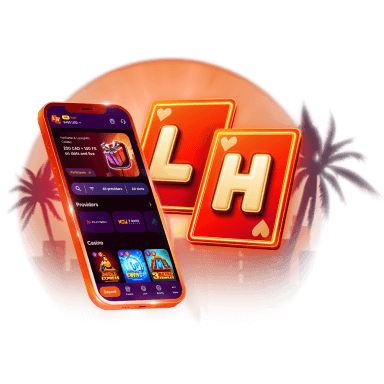
Lucky Hills is always with you!
Install the application and participate in thePlay with the App promo.
We use innovative installation technology directly from the browser. For any operating system.